
How OpenAI Scales Single PostgreSQL Instance to Millions of Queries per Second
Scaling Lessons from 800 Million ChatGPT Users and What You Can Apply to Your AI Apps

I always knew PostgreSQL was the database of choice if you’re serious about building any scalable AI app.
I know most of you want to build AI apps that can scale to millions of users, and if that’s the case, you need to learn how to use PostgreSQL efficiently or at least understand the architecture design mindset for such an app.
When I came across this article on OpenAI is scaling a single PostgreSQL instance to handle millions of queries per second for 800 million ChatGPT users, I knew this was a goldmine for our use cases.
One of the most common questions I get asked is about technology choices when building large AI applications that won’t crash on the first heavy load.
OpenAI’s database load grew by more than 10x over the past year, and they had to push PostgreSQL to its absolute limits to keep ChatGPT running smoothly.
They’re now serving millions of queries per second with a single primary instance and nearly 50 read replicas spread across multiple regions.
There are a lot of things that go into designing such a system, and they won’t all fit in this article, but at least this will point you in the right direction and help you build the right mindset.
The best part about this guide is that the principles apply whether you’re building for 1,000 users or 800 million users. The scaling strategies, optimization techniques, and architectural decisions OpenAI made can be adapted to your specific needs.
Let’s find out how you can replicate these patterns to fit your current needs or what you can learn to avoid the common pitfalls that bring down production databases.
Scaling Challenge
After ChatGPT launched, traffic grew at an unprecedented rate.
OpenAI had to scale fast, and they did what most teams would do in that situation. They increased instance sizes, added more read replicas, and implemented optimizations at both the application and database layers.
This worked well for a long time, but cracks started to form.
Single-Primary Architecture Problem
OpenAI runs a single-primary PostgreSQL setup, which means one writer handles all write operations. This might sound limiting for a service with 800 million users, but it works because their workload is primarily read-heavy.
The problem isn’t the architecture itself but what happens when things go wrong.
They experienced several high-severity incidents that followed the same pattern.
An upstream issue causes a sudden spike in database load, such as widespread cache misses from a caching layer failure, a surge of expensive queries saturating the CPU, or a write storm from a new feature launch.
When this happens, resource utilization climbs, query latency rises, and requests begin timing out.
Vicious Cycle Under Load
When requests time out, applications retry.
Those retries further amplify the load, triggering a vicious cycle that can degrade the entire ChatGPT and API services.
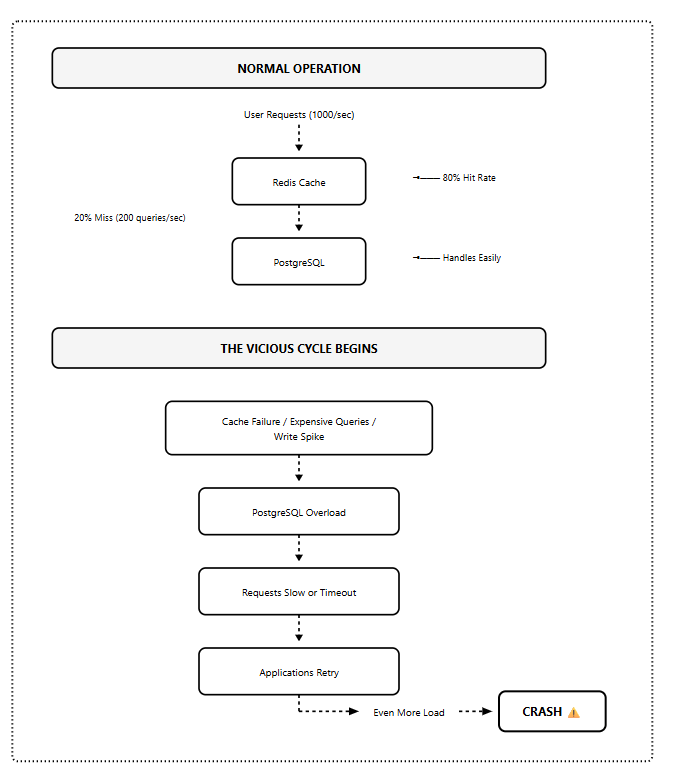
Cache failures lead to PostgreSQL overload, which causes slow responses, which trigger retries, which further increase the load. This is the scenario that brings down production databases.
PostgreSQL handles read-heavy workloads extremely well, but write-heavy workloads expose limitations in its multiversion concurrency control (MVCC) implementation.
When a query updates even a single field, PostgreSQL copies the entire row to create a new version.
Under heavy write loads, this results in significant write amplification and increased read amplification since queries must scan through multiple tuple versions to retrieve the latest one.
OpenAI’s solution was to migrate shardable write-heavy workloads to sharded systems like Azure Cosmos DB while keeping PostgreSQL unsharded with a single primary for their read-heavy workloads.
The key insight here is understanding your workload characteristics before choosing your scaling strategy.
How Does this Apply to Your AI App Design?
The patterns OpenAI encountered aren’t unique to ChatGPT’s scale.
These same issues show up in applications serving 1,000 users, 10,000 users, or 50,000 users. The vicious cycle doesn’t care about your user count but your architecture.
So, how do you design your application to avoid these problems? Let me show you with a real project that most of you are either working on or will work on soon.
Your AI Chatbot Project
You are building an AI-powered customer support chatbot and designing it from the ground up using OpenAI’s lessons.
You’ve built the initial version. It’s working great in development and has even handled your first 1,000 users without breaking a sweat.
Your PostgreSQL setup looks reasonable:
One database instance handles everything
Direct connections from your application
Basic caching for user sessions
Standard queries to fetch conversation history
The application works, and the early adopters love it.
Now you land a big client with 50,000 support agents who will use your platform simultaneously during peak hours.
This is where the lessons from OpenAI’s guide are needed.
Your chatbot needs to do three main things constantly:
Fetch conversation history when agents open a chat (read-heavy)
Store new messages as conversations happen (moderate writes)
Query user context and previous interactions (read-heavy)
Within the first hour of launch, you start seeing timeouts.
Your monitoring dashboard shows:
Database CPU at 95%
Connection count is hitting the 5,000 limit
Query response times jumping from 20ms to 2 seconds
Cache hit rate dropping from 80% to 30%
You have just started hitting the same Vicious Cycle
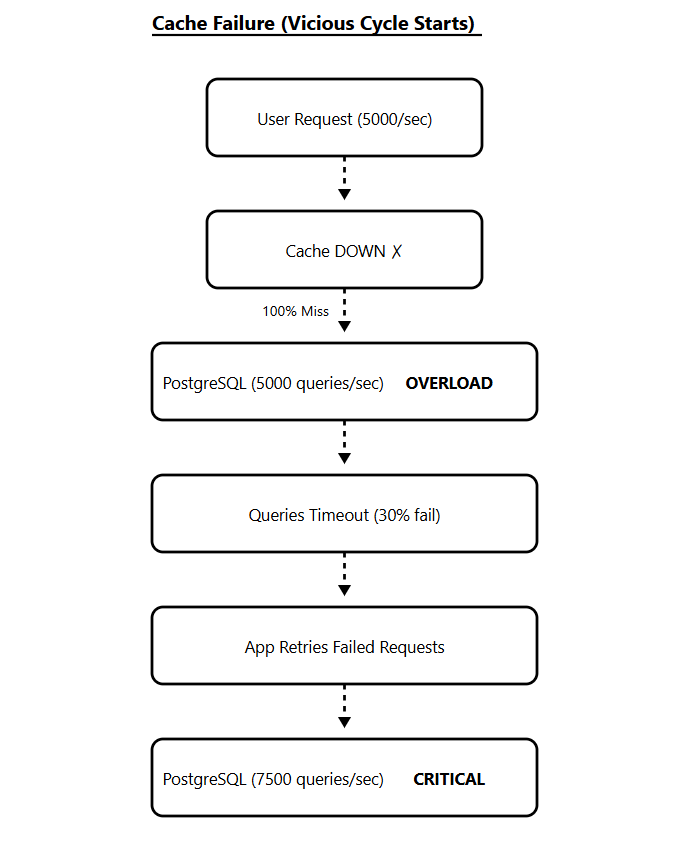
Your Redis cache layer goes down for 3 minutes during a deployment.
Suddenly, every conversation history request hits PostgreSQL directly. What was 100 queries per second becomes 5,000 queries per second.
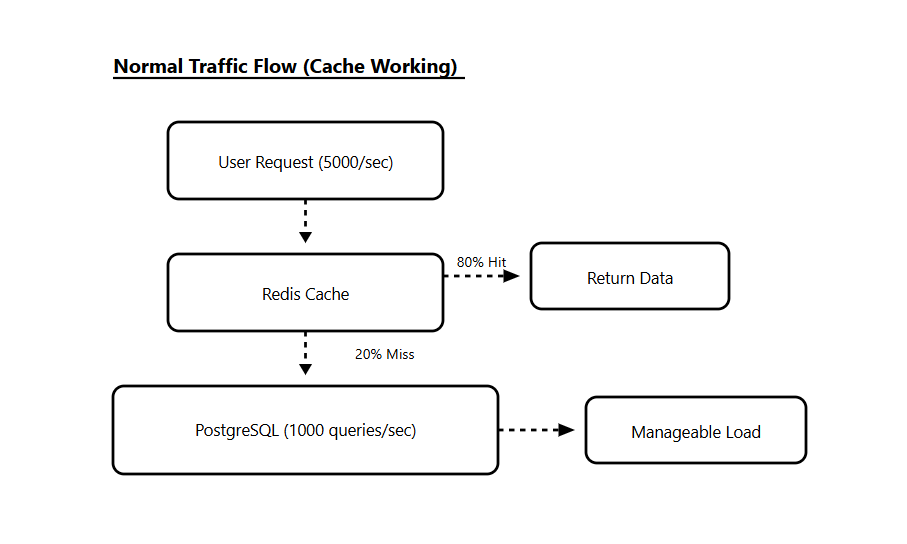
The database can’t handle the load. Queries start timing out. Your application retries those failed queries, which adds even more load.
What’s Happening?
Your conversation history table looks like this:
CREATE TABLE conversations (
    id SERIAL PRIMARY KEY,
    user_id INTEGER,
    agent_id INTEGER,
    message TEXT,
    created_at TIMESTAMP,
    metadata JSONB
);

CREATE INDEX idx_user_conversations ON conversations(user_id, created_at);
Every time an agent opens a chat, you run:
SELECT * FROM conversations
WHERE user_id = ?
ORDER BY created_at DESC
LIMIT 50;
This query is fast when you have 1,000 users. But with 50,000 concurrent users, you’re running this query thousands of times per second.
Each query needs to scan the index, fetch rows, and return data. Under normal load, PostgreSQL handles this fine. Under spike load, it can’t keep up.
Connection Exhaustion
Your application opens a new database connection for every request.
With 5,000 concurrent connections, PostgreSQL hits its connection limit. New requests start failing with “too many connections” errors.
Your application’s connection pool settings:
pool_size = 50  # connections per app instance
max_overflow = 100  # additional connections when needed
With 50 application instances, you potentially create 7,500 connections. PostgreSQL can’t handle it.
Write Amplification
Your chatbot also writes every new message to the database:
INSERT INTO conversations (user_id, agent_id, message, created_at, metadata)
VALUES (?, ?, ?, NOW(), ?);
With 50,000 agents handling an average of 5 conversations simultaneously, you’re looking at 250,000 active conversations.
If each conversation generates 10 messages per minute, that’s 2.5 million writes per minute or roughly 41,000 writes per second.
PostgreSQL’s MVCC system creates a new row version for every write. Old versions become dead tuples that need to be cleaned up by autovacuum.
Under this write load, autovacuum can’t keep up. Your tables bloat, indexes grow, and queries slow down even more. And at this point, you are likely to give up!
You start looking at sharding solutions, NoSQL databases, or managed services that promise infinite scale.
But OpenAI showed there’s another way.
The problem isn’t PostgreSQL, but how you’re using it.
Let’s redesign this architecture using the lessons from OpenAI’s guide and build something that scales.
Architecture Solution
OpenAI’s solution centers on one primary PostgreSQL instance with nearly 50 read replicas distributed across multiple geographic regions.
The architecture looks simple on paper, but making it work at this scale required extensive optimizations across multiple layers.
Here’s how we redesign the AI chatbot platform using OpenAI’s scaling principles.
We’re keeping the single-primary PostgreSQL architecture but adding critical layers that make it work at scale.
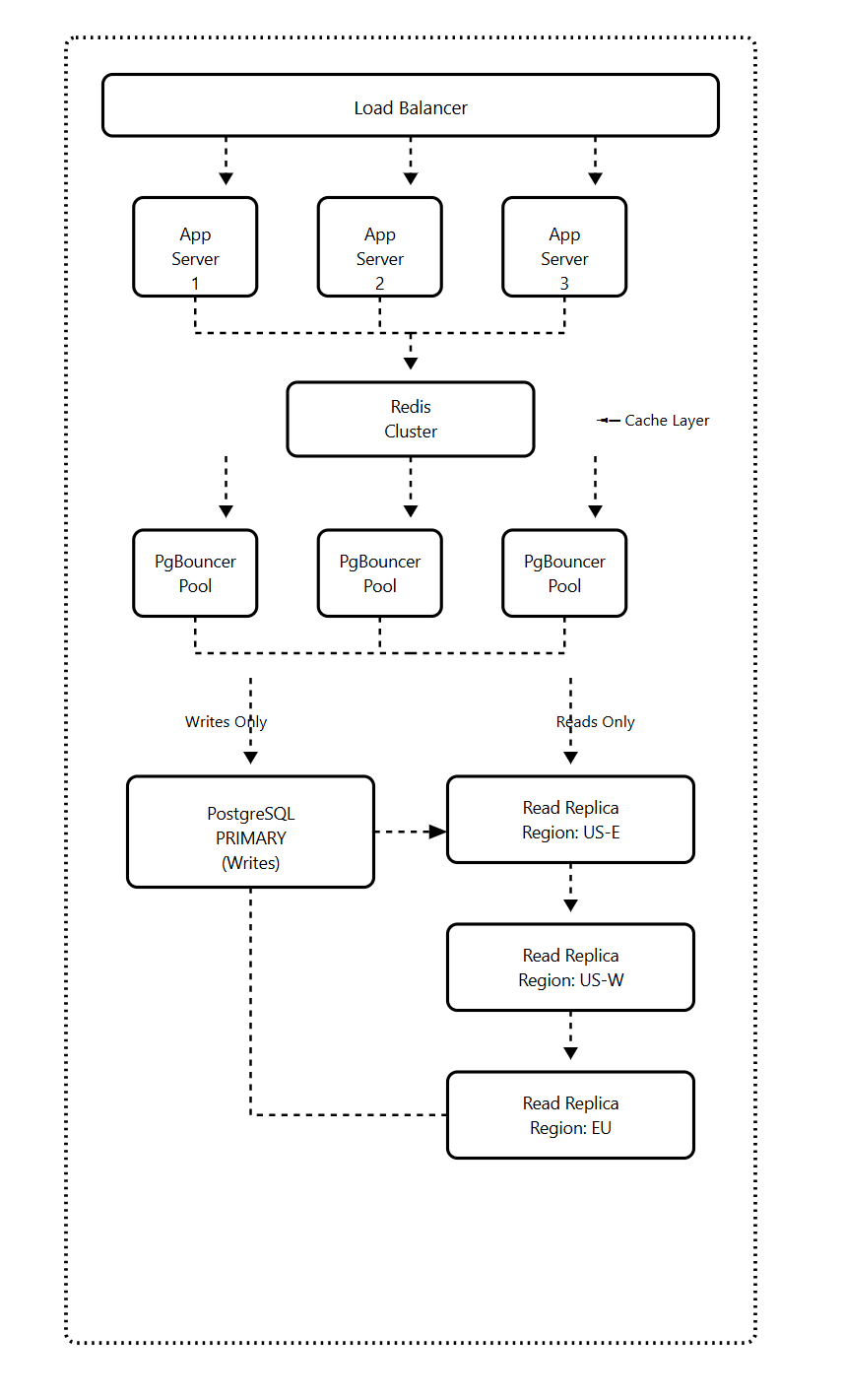
Each layer solves a specific problem from the previous section.
Layer 1: PgBouncer for Connection Pooling
Instead of your application connecting directly to PostgreSQL, all connections go through PgBouncer first.
Your 10,000 application connections get pooled into just 100 PostgreSQL connections. Connection setup time drops from 50ms to 5ms, and you never hit the connection limit.
Layer 2: Cache Locking
The critical feature that prevents a thundering herd during cache failures.
When your cache goes down, only one request per cache key hits PostgreSQL. All other requests wait for the cache to be repopulated instead of overwhelming the database.
Layer 3: Read/Write Split
95% of your chatbot queries are reads (fetching conversation history). Only 5% are writes (storing new messages).
All reads go to replicas. Only writes touch the primary. This keeps your primary free to handle write spikes without being saturated by read traffic.
Layer 4: Rate Limiting
Application-level rate limiting prevents any single user from overwhelming your system.
You set limits like 100 conversation fetches per minute per user and 30 new messages per minute per user. Even if someone tries to abuse your API, they can’t take down your database.
Layer 5: Regional Replicas
For a global chatbot, you deploy read replicas in each major region. Users read from their nearest replica, reducing latency from 200ms to 20ms.
How the System Handled Failures
Cache failure: Cache locking prevents database overload. Only one request per key hits the database. Performance degrades but doesn’t crash.
Replica failure: Traffic automatically routes to healthy replicas. There is no manual intervention needed.
Primary failure: Hot standby promotes to primary automatically. Downtime is 30-60 seconds while read traffic continues uninterrupted.
I’ll be covering the complete implementation of this architecture in the upcoming AI Build & Deploy Series, where we’ll build this chatbot step by step with:
Complete Docker setup with PgBouncer, PostgreSQL, and Redis
Python code for the database router (read/write split)
Cache locking implementation that prevents thundering herd
FastAPI endpoints with rate limiting
Load testing scripts to verify it works under pressure
Monitoring dashboards to track what matters
The complete code, including error handling, connection pooling configuration, cache implementation, and deployment setup, will be available in the series.
Final Thoughts
OpenAI's approach to scaling PostgreSQL shows it can scale further than most people realize when you apply the right strategies.
It demonstrates that with proper architecture, query optimization, connection pooling, caching, and workload isolation, a single-primary PostgreSQL instance can serve hundreds of millions of users.
These principles work at 1,000 users, 100,000 users, or 10 million users.
Your database architecture doesn’t need to be perfect from day one, but it should be designed to evolve as your application grows.
If you’re building an AI application and wondering whether PostgreSQL can handle your scale, the answer is probably yes, as long as you build with these principles in mind.
What’s your experience with scaling PostgreSQL? Leave a comment below with your challenges or questions.
AI Software Engineer
Let’s Build The Coding Future Together